Skip to content

The WhatsApp inbox your whole support team shares.

Bring your numbers together, give every conversation an owner and keep the customer’s history in view while you reply.

Customers who have waited longest come first.

The queue is ordered by waiting time, response targets and priority. A banner at the top counts urgent conversations and shows the longest wait.

Everyone’s share
The To do, Mine and Unassigned filters show what belongs to each agent. Try them on the queue alongside.
Saved replies
Type / in the reply box to insert a quick reply, then send it.
InboxOnline
3 priority conversationsLongest wait: 16 min2 SLA
Hamza HajjiCommandes & conseils
OPEN

Parfait, merci pour votre aide !

Quick replies (type /)Esc
  • /bonjourEnterBonjour, merci pour votre message. Comment puis-je vous aider ?
  • /delaiLa livraison prend 2 à 3 jours ouvrés. Le livreur vous appelle avant son passage.
  • /adresseEnvoyez-moi la nouvelle adresse et je la transmets au livreur avant l’expédition.

In this demo, one minute passes every three seconds.

Every conversation has someone looking after it.

Before assigning, see who is available and how many conversations each person already has. When a colleague takes over, their name stays pinned at the top.

Sara Skalli OPENService après-vente
Urgent
Team replies

AI assistance stays available on request.

Wakha, tsennit réponse dyalkom.

Waiting 18 min
Assign to
Omar Tazi’s access
Role
Access type
Select WhatsApp numbers
Team workload

Open conversations on the numbers you have access to.

  • Nadia BennaniAvailableOwner · All numbers
    Active
    3
    Priority
    3
    Customers waiting
    2
  • Yassine El AmraniAvailableSupervisor · All numbers
    Active
    3
    Priority
    1
    Customers waiting
    0
  • Salma IdrissiBusyAgent · All numbers
    Active
    0
    Priority
    0
    Customers waiting
    0
  • Omar TaziAvailableAgent · 2 numbers
    Active
    4
    Priority
    2
    Customers waiting
    3
  • Imane AlaouiAwayAgent · All numbers
    Active
    4
    Priority
    1
    Customers waiting
    3
  • Mehdi BerradaBusyAgent · All numbers
    Active
    3
    Priority
    0
    Customers waiting
    2
  • Lina FassiOff dutyAgent · All numbers
    Active
    3
    Priority
    2
    Customers waiting
    3
Three roles
Owners, supervisors and agents each have their own access.
Access by number
Choose which WhatsApp lines each agent can see.

The assistant answers with what you have approved.

Add your delivery times, exchange terms and everyday answers. Each source is either approved for automation or kept for human review.

Your team stays in charge
As soon as an agent takes over a conversation, the assistant stops replying on its own.
Set number by number
Each WhatsApp line can follow the general settings or have its own.
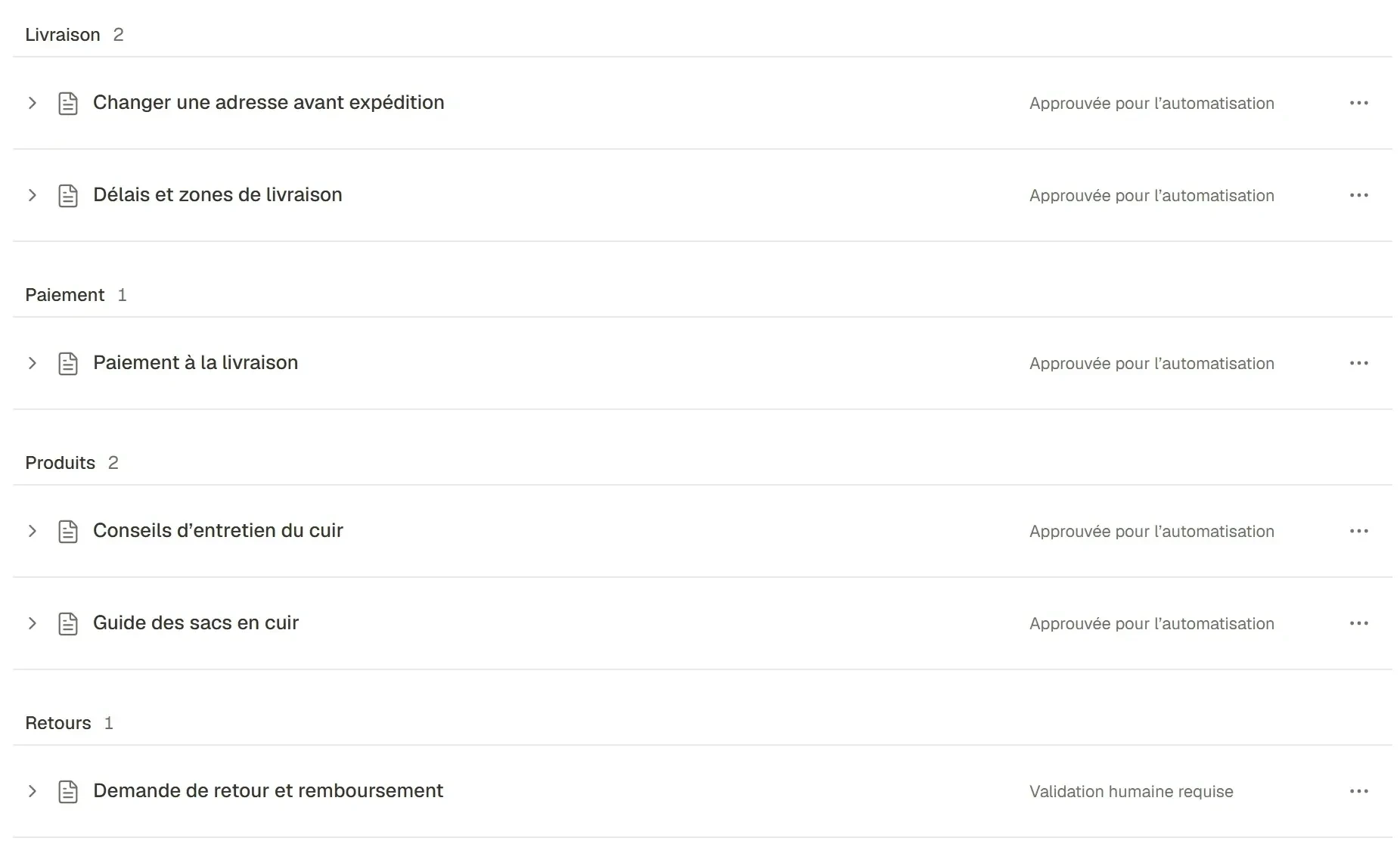
Library · AI sources
Assistant sources grouped by topic: delivery, payment, products and returns, each with its permission level.

Around the conversation.

Customer profiles, scheduled follow-ups and team numbers live in the same workspace as the inbox.

Response times, agent by agent

Message volume, resolution, response targets met and the assistant’s share of replies, filtered by number and date range.

AnalyticsAll numbersLast 30 days
Conversations
148
24 open
Median response
10 min
148 responses measured
Resolution
84%
124 resolved
SLA compliance
95%
275 targets completed
Message volume

Incoming and outgoing over the selected period.

IncomingOutgoing
AI and team

Who sent the outgoing replies.

20% AI
68AI replies
265Human replies
Agents
  • Omar Tazi29taken on4 minaverage response
  • Imane Alaoui29taken on4 minaverage response
  • Lina Fassi28taken on4 minaverage response
  • Mehdi Berrada27taken on4 minaverage response
  • Nadia Bennani26taken on5 minaverage response
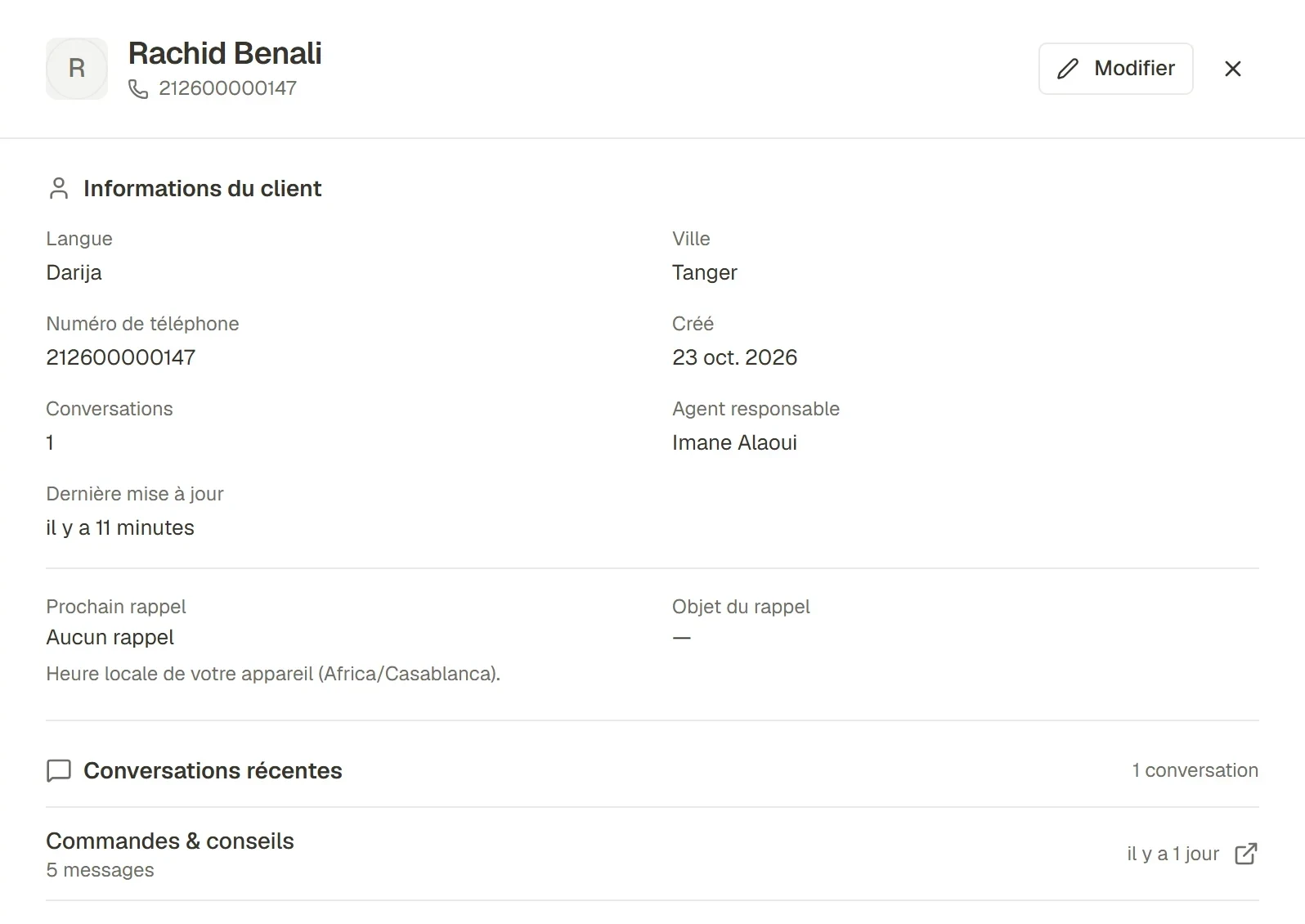
One profile per customer

City, language, assigned agent, reminders and past conversations, all in view during the exchange.

Rachid Benali’s customer profile: language, city, phone number, assigned agent, next reminder and recent conversations.

Messages that go out when you planned

Schedule a follow-up from the conversation and track sends that are pending, sent or failed.

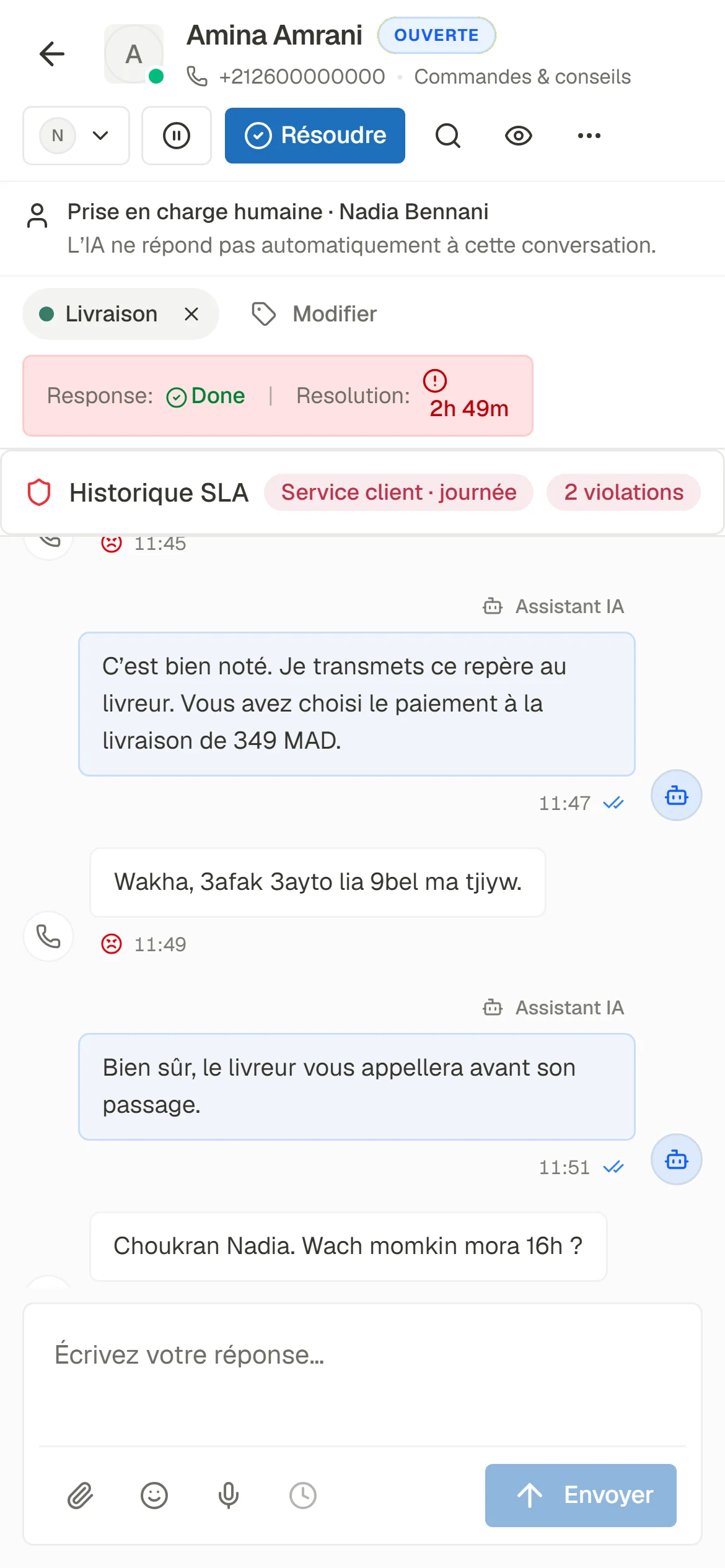
Away from the desk, the conversation stays whole.

On a phone, agents keep the assignment, tags, response-time tracking and every reply tool.

Wabox conversation on a phone: human takeover by Nadia Bennani, the Livraison tag, response-time tracking and messages in Darija.

Common questions

Can we bring several WhatsApp numbers together?

Yes. All your numbers arrive in the same workspace. Agent access and some assistant settings are configured number by number.

Does the assistant send messages without approval?

That depends on the mode you choose. When it helps agents, it suggests replies for the agent to review. Automatic modes stick to approved sources and hand uncertain or sensitive requests to the team.

Does Wabox manage orders and payments?

No. Wabox organizes customer service on WhatsApp and keeps lightweight customer context. It does not replace your online store.

How does a supervisor step in?

Supervisors follow the team’s workload, assign conversations and take over the ones that need them. Escalations, internal notes and response targets help them spot requests that are running late.

Show us how your team replies today.

We will go through your numbers, your team and the requests that come up most often.