
The accountant approves
Assisted reading prepares the entry. Your firm corrects and approves each invoice before it joins an export.
FiduciaFlow brings together missing documents, invoices to review and VAT periods for every client. Each morning, you know which file to open first.
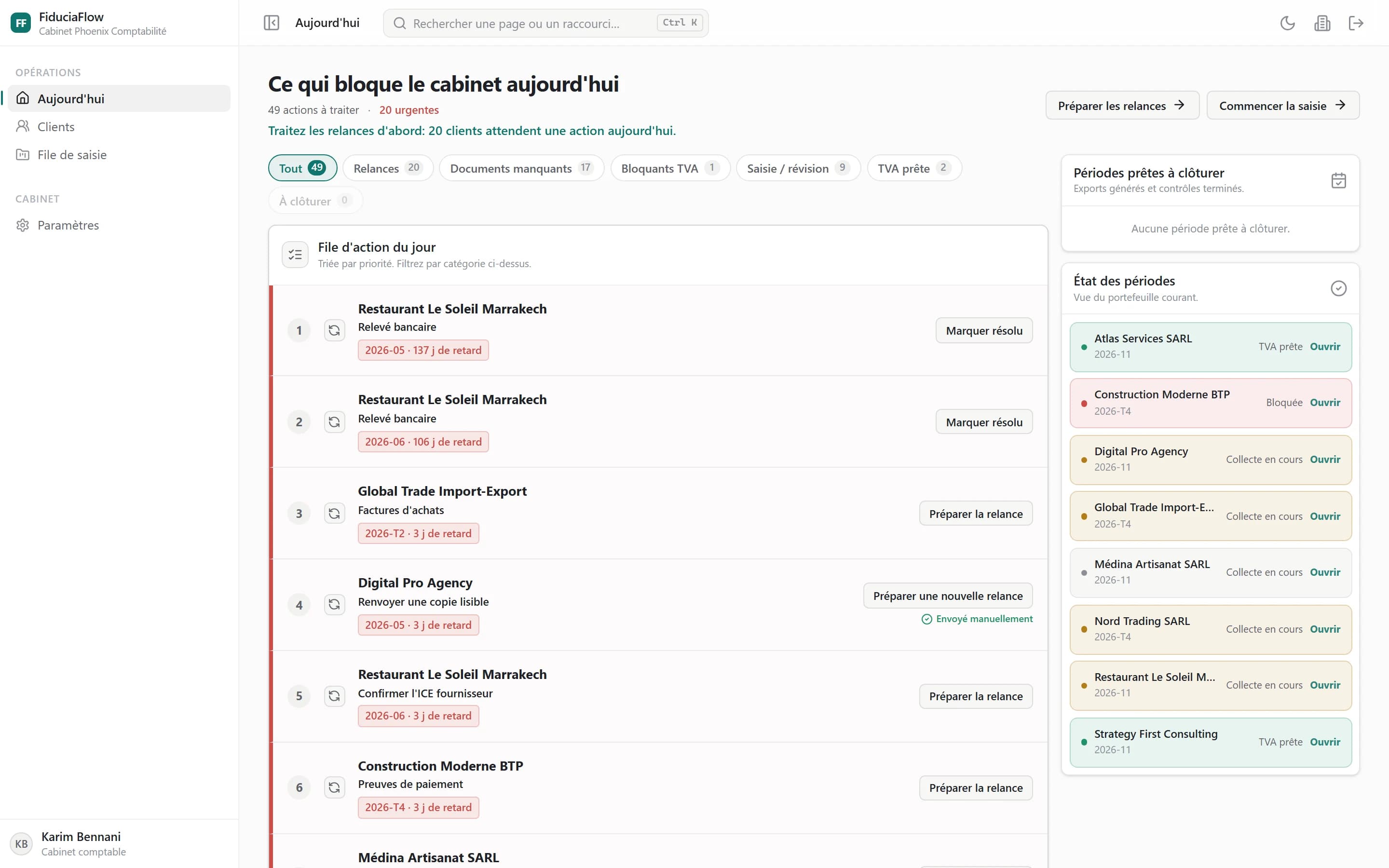
What is blocking the firm today
49 actions to handle·20 urgent
Start with reminders: 20 clients are waiting on an action today.
What is blocking the firm today
49 actions to handle·20 urgent
Start with reminders: 20 clients are waiting on an action today.
The portfolio shows each company’s status, ICE number, contacts and VAT regime. Filter at-risk files or search by company name, ICE or email.
Try “atlas”, “0019” or the At risk filter.
From the current period, FiduciaFlow drafts the list of expected documents and open requests with their deadlines. The client answers from a phone, and the document received is filed under their period.
The item turns to received on the firm’s side. Accounting checks stay in your workspace.
Atlas Services SARL
ICE 002145879000021 · VAT Monthly / Accrual
Document uploaded · Client portal · releve-bancaire-mai-2026.pdf
Hello, Atlas Services SARL
Upload your documents below. The application files them, your firm checks them.
1 supporting document received. Automatic filing continues in the background.
In the review queue, the invoice stays next to the accounting fields. You check the counterparty, ICE number, amounts and VAT rate before approving.
18, avenue des Entreprises · Casablanca, Morocco
ICE: 009999888000012 · Tax ID: 9999888
Invoice
No. FV-2026-010
Date: 27/10/2026
Currency: MAD
Billed to
Client Pro Solutions
Casablanca · Morocco
Net total15,000.00
VAT 20%3,000.00
Gross total18,000.00Payment by bank transfer
Extracted: 00999988800012
Not approved: this invoice is left out of every export.
Hover a field or an area of the invoice to link them.
The Periods & VAT view ranks periods by what blocks them: missing documents, open requests, duplicates to settle. Open a period to check what is left to handle and prepare the file for SIMPL‑TVA.
Your firm still files the return itself.
Periods & VAT
Prepare the deductions statement for SIMPL-TVA and the return totals to approve.
Priority VAT blockers
Firm view
Every client period, sorted by blocker and useful action.
Selected period
Atlas Services SARL · May 2026
BlockedThe final return is still filed by the firm.
Deductions ZIP for SIMPL-TVA, prepared return, reconciliation and exclusions. Checked by the accountant before filing.
Export blocked: 3 corrections
Every file generated for Sage, KHABIR, Odoo, CSV or Excel is kept with its SHA‑256 fingerprint. The validation report checks the entry count, the debit/credit balance and a CSV round trip.
A file marked “to test” should first be imported once into your software. The outcome is recorded in the firm’s pilot evidence.
Accounting exports
Files for Sage, KHABIR, Odoo, CSV or Excel.
SHA-256 77eac72c16a0…SHA-256 78ea3d48484f…SHA-256 48dcf4d3b8db…SHA-256 5c3494cac673…77eac72c16a04d9be3f1058c2a6b7d40913ef58a0c64b2d7f19e3a85c0d46b12Captures of the application, taken with fictional companies and data. Its interface is in French.
Assisted reading prepares the entry. Your firm corrects and approves each invoice before it joins an export.
Expected documents, collected and deductible VAT, blockers and the preparation file sit under the client’s period.
The firm and the client have separate views. Permissions are checked server-side, by firm and by company.
The audit log keeps the file’s events. An export keeps a snapshot of its data and its file’s fingerprint.
No. FiduciaFlow prepares the totals, flags blockers and generates a preparation file. The return and its filing remain your firm’s responsibility.
No. Document reading assists data entry, but the accountant checks, corrects and approves each invoice. Unapproved invoices are excluded from exports.
The report checks the format and the entries. Your firm then tests the import in its software and records the software name, version and outcome in the pilot evidence.
Their requests, uploads, shared documents and a simple history. Entry fields, VAT calculations and internal checks stay on the firm’s side.
We will start from how you collect documents, run your checks and prepare your monthly exports.